 Linkmisty
Pick a visual that explains the destination at a glance.
Free, effectively unlimited cards. Turn social traffic into Revenue Share.
Create. Share. Get seen. Turn traffic into revenue.
With Linkmisty, card creation is free and effectively unlimited within Fair Use. Share your links on social media and receive a portion of valid advertising revenue generated on eligible ad-enabled cards through Revenue Share. Do not let your traffic end as just another page view.
✓ Free▣ OGP▥ PV / UU / Click◎ Revenue Share
● PROFILE▣ MEDIA▧ PORTFOLIO▰ SHOP
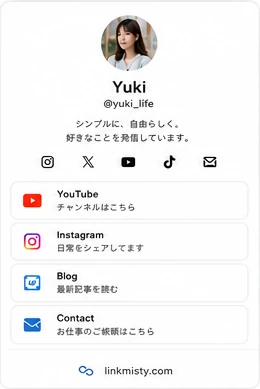 STANDARD
 MAGAZINE
 BENTO
BENTO PORTFOLIO
 HERO
HERO✦Customize
freely
freely
✓Choose a
template
template
10.3M+Linkmisty page views
1,022+Published content
Start with your use case
Choose what you do and Linkmisty opens the right page type and design.
RestaurantsReservations, menus and social links→CreatorsPortfolio, social links and monetization→Social affiliate marketersTurn social traffic into affiliate-ready funnels→E-commerceProducts and purchase links in one shop→FreelancersWork, services and contact links→InfluencersSocials, brand links and campaigns→
What is a link card?
A link card turns a plain URL into a visual destination with an image, title and description so people can understand what is behind the link before they click. It can be shared anywhere URLs are accepted, including X, Threads, LINE, blogs and email. Linkmisty lets you control the visual presentation and publish it as a dedicated URL, with OGP support, cushion pages, traffic analytics, profile pages and monetization tools in one place.
https://example.com/article
↓

Linkmisty link card
Explain the destination with an image, title and description.
linkmisty.comHow to create a link card
Five simple steps from image to shareable URL.
Add the message and destination.
Select news, social, video and other layouts.
Check the mobile preview and publish.
Use it on X, Threads, LINE, blogs and more.
Where can Linkmisty link cards be used?
Use them anywhere you can place a URL: profiles, posts, DMs, articles, email and QR codes.

X
Posts, profiles and replies

Threads
Posts and profile links

Profile and story link flows

TikTok
Profile and video descriptions

LINE
Chats, broadcasts and open chats

note
Articles and profiles

Discord
Server guides and pinned posts
Blogs
Visible calls to action inside articles
Newsletters and signatures
QR codes
Bridge offline traffic to a link card
Link cards you can build with Linkmisty
Turn the same destination into a layout that fits your content.
Articles and breaking updates
Continue from a social post
Vertical video and reels
Video thumbnail first
OPEN LINK →
Products, articles and campaigns
Collect links and activity
List products and services
Long-form stories, search traffic and Revenue Share
Plain URL vs. Linkmisty link card
The destination may be the same, but presentation and measurement are different.
| Feature | Plain URL | Linkmisty |
|---|---|---|
| Image | Limited | Custom image |
| Title | Limited | Custom title |
| Design | No | Templates |
| Click tracking | No | Per card |
| PV / UV analytics | No | Included |
| Cushion page | No | Supported |
| Monetization | No | Eligible ad revenue |
Connect the social posts you already make to Revenue Share
Supported standard cards can display advertising, and Profile / Shop Cards can optionally turn ads on or off on every plan, including Free, with OFF as the default. CPM-style advertising value varies with valid ad impressions, geography, eCPM, inventory and other conditions. A plan-based portion of revenue confirmed as valid by the advertising side can be shared with you.
Put the details, comparison or continuation of your post on it
Add the URL to the posts and profiles you already use
Genuine visits and eligible ad impressions accumulate
Receive Revenue Share on confirmed ad revenue
Main Linkmisty features
▣
Link card builder
Set image, title, description and URL.
▦
Templates
Choose layouts for news, video, profiles and more.
▥
Analytics
Track PV, unique visitors, clicks and CTR.
◎
Monetization
Revenue Share on eligible ad revenue.
✦
Customization
Edit colors, images, text and links.
QR
QR sharing
Use your URL in offline materials.
✓
Cushion pages
User-controlled tap-through where supported.
□
Card management
Manage and edit created cards in one place.
FAQ
Frequently asked questions
Answers to the questions Linkmisty users most often have before and after getting started.
QWhat is a link card?
A
A visual page that explains a destination URL with an image, title and description before the user clicks.
QCan I create link cards for free?
A
Yes. The Free plan supports effectively unlimited creation within Fair Use.
QCan I use a link card on X?
A
Yes. Paste your Linkmisty URL into posts, profiles or replies.
QCan I use a link card on Threads?
A
Yes. Use it in Threads posts or your profile.
QWhat image size should I use?
A
Keep key text and faces near the center so the design remains clear if a platform crops the preview.
QWhat is OGP?
A
Metadata used by social platforms to understand a page title, description and preview image.
QWhy is my link card not showing?
A
Check platform cache, metadata fetch timing, the URL and publication status.
QCan I edit a link card later?
A
Yes. Logged-in users can edit cards later from the card list.
QWhat can I do with Linkmisty?
A
You can create link cards, profile pages, shop pages, and MISTY STORY long-form articles with dedicated public URLs for search indexing. Analytics and ad monetization are also supported.
QCan I use Linkmisty without creating an account?
A
Yes. Guests can create cards. Guest use has limits on the number of items and how long they are stored. A free account is recommended for continued use.
QHow many items can I create on the Free plan?
A
On the Free plan, you can create effectively unlimited link cards and profile pages within Fair Use. Created pages are stored permanently.
QWhat kinds of pages can I create?
A
You can create link cards for social traffic, MISTY STORY long-form articles, profile pages that collect multiple links, and shop pages for products and services.
QCan I use Linkmisty on X, Instagram, TikTok, and Threads?
A
Yes. You can use the URL you create in social profiles, posts, DMs, blogs, websites, and more.
QWill an image and title appear when I share on social media?
A
Yes. Linkmisty supports OGP, so supported social platforms can display the card image, title, and description. Changes may take time to appear because of platform-side caching.
QCan I edit a card after I create it?
A
Yes. Logged-in users can edit created cards and profile pages later from their account.
QDoes clicking a link immediately open the external site?
A
Depending on the card type, Linkmisty may show a cushion page first and move to the destination after the user taps. Linkmisty does not perform unintended automatic redirects or force apps to open.
QCan I check traffic numbers?
A
Yes. You can check PV, unique visitors, clicks, CTR, and more to see which cards are viewed and clicked most.
QCan I monetize with Linkmisty?
A
Yes. Linkmisty provides a Revenue Share system that returns part of eligible revenue generated by ads displayed on supported pages to users.
QCan I turn ads ON or OFF myself?
A
Ad display can be configured on supported pages. Available controls may differ by plan and page type.
QWhat changes with Pro or Business?
A
Monetization features are strengthened with a higher Revenue Share than Free, referral features, and a share of revenue generated by referred users. Business also includes a higher Revenue Share and expanded invitation features.
QCan I earn by referring other users?
A
Yes. Pro and Business support referral features. A portion of revenue generated by users you refer can be returned to you as the referrer.
QHow do I receive my earnings?
A
Confirmed earnings accumulate in Linkmisty, and you can request a payout after meeting the minimum payout requirement. PayPal is the standard method. Japanese nationals can also use bank transfer to a Japanese bank, with fees.
QCan I create and edit using only a smartphone?
A
Yes. Linkmisty is designed so you can create and edit from smartphones and tablets as well as PCs.
QCan I use Linkmisty commercially?
A
Yes. Commercial use is supported for product sales, stores, companies, creators, affiliates, and more.
QWhat is the payout cycle?
A
Payouts are closed at the end of each month and paid at the end of the following month. Confirmed earnings up to the date of your payout request are paid at the end of the next month.
QWhat is the minimum payout amount?
A
The minimum payout amount is USD 30.
Link card guides
Detailed answers for the most common link-card search intents.
linkmisty.com/guide/link-card
LINK CARDLinkmisty
↗LINK CARD
URL → CARD → CLICK
What is a link card?
How it works and how it differs from OGP
linkmisty.com/guide/link-card
CREATELinkmisty
+CREATE
URL → CARD → CLICK
How to create a link card
A beginner-friendly walkthrough
linkmisty.com/guide/link-card
X / LINK CARDLinkmisty
XX / LINK CARD
URL → CARD → CLICK
Using link cards on X
Posts and profile flows
linkmisty.com/guide/link-card
THREADSLinkmisty
@THREADS
URL → CARD → CLICK
Using link cards on Threads
Natural paths from posts
linkmisty.com/guide/link-card
LINELinkmisty
LINELINE
URL → CARD → CLICK
Using link cards on LINE
Chats, broadcasts and QR
linkmisty.com/guide/link-card
OGP PREVIEWLinkmisty
OGPOGP PREVIEW
URL → CARD → CLICK
What is OGP?
How images and titles are shared
linkmisty.com/guide/link-card
CACHE / OGPLinkmisty
↻CACHE / OGP
CACHE → REFRESH
Why a link card is not showing
Caching, metadata and URL checks
linkmisty.com/guide/link-card
IMAGE SIZELinkmisty
▣IMAGE SIZE
URL → CARD → CLICK
Link card image sizes
Ratios and crop-safe design
linkmisty.com/guide/link-card
FREE CREATELinkmisty
✓FREE CREATE
URL → CARD → CLICK
Create link cards for free
How to start on Free
linkmisty.com/guide/link-card
COMPARELinkmisty
⇄COMPARE
URL → CARD → CLICK
Compare link-card tools
What to evaluate before choosing
Free guides & tools you can use now
Learn link-in-bio growth, check OGP, build UTM URLs and calculate CPM before creating your Linkmisty page.
linkmisty.com/guide/link-card
LINK IN BIOLinkmisty
◎LINK IN BIO
URL → CARD → CLICK
What Is a Link in Bio? Build One Free with Linkmisty
Learn how a link-in-bio page organizes multiple destinations from Instagram, TikTok, X and other profiles with analytics and monetization options.
linkmisty.com/guide/link-card
FREE BIO LINKLinkmisty
✓FREE BIO LINK
URL → CARD → CLICK
How to Create a Free Link in Bio
A practical guide to building a free bio link page, adding destinations, publishing it and measuring clicks.
linkmisty.com/guide/link-card
AFFILIATE BIOLinkmisty
↗AFFILIATE BIO
URL → CARD → CLICK
Affiliate Link in Bio Guide
Organize Amazon, marketplace and affiliate offers behind an informative bio page instead of dropping raw affiliate URLs everywhere.
linkmisty.com/guide/link-card
LINKTREE ALTLinkmisty
⇄LINKTREE ALT
URL → CARD → CLICK
Linktree Alternative: What to Compare
Compare link-in-bio tools by page design, analytics, visual link cards, pre-sell pages and monetization rather than link count alone.
Free OGP Preview Checker
Inspect the metadata a social platform may read before you publish or troubleshoot a shared link.
Free UTM Builder
Create a campaign URL for social, email, ads or creators without manually editing query strings.
Free CPM & eCPM Calculator
Quickly understand the relationship between impressions, CPM and advertising revenue.
Do not let your traffic end as just another page view.
Create cards free within Fair Use and give the social traffic you already have another opportunity to generate value.
Create a free card and start monetizing →